Why Aesthetic iPhone Themes Are Trending in 2026 (And How to Build Yours)
Scroll through TikTok or Pinterest in 2026 and you’ll notice something: iPhone home screens aren’t just functional anymore—they’re curated. From soft “clear” icon sets to hyper-saturated Y2K layouts, aesthetic iPhone themes have become a visual identity statement.
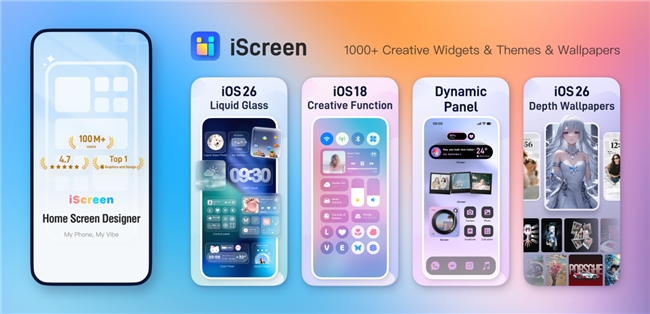
This shift isn’t random. Apple’s Liquid Glass design language in iOS 26 introduced translucent icons, spatial wallpapers, and dynamic widgets that make personalization more expressive than ever (Apple, 2025). At the same time, theme apps are seeing massive engagement—Widgetsmith holds a 4.5+ rating with over 700K reviews, while iScreen maintains a 4.7 rating with 100K+ ratings on the App Store—proof that customization has gone mainstream.
Here’s why aesthetic themes are trending now, what changed with Liquid Glass, and how to build a cohesive look without spending hours tweaking individual widgets.
The Cultural Shift Toward Visual Personalization
In 2026, your home screen is part of your digital persona. Gen Z and Millennials increasingly treat their phones like social profiles—something to style, screenshot, and share.
Apple reinforced this shift when it described iOS 26 as “more personal and expressive,” introducing Liquid Glass as its first major design overhaul since iOS 7 (MacRumors, 2025). The update brought translucent layers, adaptive lock screen time resizing, and 3D “spatial scenes” for wallpapers (Ars Technica, 2025). That means your wallpaper, clock, and widgets now respond dynamically to content and movement.
When the operating system becomes more visual, users naturally want more visual control. That’s where aesthetic themes thrive.
From Single Widgets to Full Theme Ecosystems
Early customization apps focused on one feature: widgets. But in 2026, the trend has evolved beyond individual widgets.
According to customization roundups from SlashGear (2024) and The Mac Observer (2025), users increasingly favor apps that bundle:
Coordinated icon packs
Matching widgets
Live wallpapers
Lock Screen layouts
Dynamic Island elements
Instead of manually mixing tools from five different apps, many users now download full aesthetic bundles.
This is the difference between:
Functional customization (weather, calendar, battery widgets)
Cohesive visual ecosystems (icons + wallpaper + widgets designed together)
Apps like iScreen position themselves around this second category—delivering complete theme sets rather than isolated components. It’s less about micro-adjusting font weight and more about achieving a unified visual identity in minutes.
The shift mirrors fashion: people don’t just buy one accessory—they buy the full look.
Liquid Glass Changed the Design Game
The real inflection point for aesthetic themes was Apple’s official release of iOS 26 on September 15, 2025 (MacRumors, 2025).
Liquid Glass introduced:
Translucent, refractive icon styling
A new “clear” icon appearance
Dynamic Lock Screen clock resizing
3D spatial wallpaper effects
Expanded widget customization APIs for developers
Apple described it as its “broadest design update ever” (Business Insider, 2025). The redesign extends across buttons, tab bars, and system controls—bringing a glass-like sheen to the entire interface (The Verge, 2025).
For theme creators, this unlocked a new aesthetic layer: transparency.
Instead of flat pastel icons, designers now experiment with:
Frosted glass icon overlays
Semi-transparent widget backgrounds
High-contrast wallpapers designed for refraction effects
Layered lock screens that complement adaptive clocks
However, Liquid Glass hasn’t been universally praised. Some users criticized legibility and visual intensity during early rollout (New York Post, 2025). That backlash reinforced an important trend: aesthetics must balance beauty and usability.
The most popular themes in 2026 aren’t just pretty—they’re readable, balanced, and optimized for the translucency effect.
Why Bundled Themes Reduce Setup Friction
One major reason aesthetic themes are trending: they solve complexity.
Manual customization can involve:
-
Creating custom app shortcuts
-
Matching hex colors
-
Aligning widget spacing
-
Finding compatible live wallpapers
-
Adjusting for Lock Screen layout changes
For new users, that’s overwhelming.
Theme bundles remove friction by pre-aligning:
Icon packs sized for iOS 26
Widget color palettes matched to wallpapers
Lock Screen widgets placed to avoid adaptive clock overlap
Dynamic Island visuals that complement the theme
Instead of spending hours in trial-and-error, users can apply a downloadable collection and refine from there.
What the Future of iPhone Customization Looks Like
Looking ahead, three forces are shaping customization in 2026 and beyond:
1. Transparency-Optimized Design
With Liquid Glass here to stay, themes are increasingly designed for translucency, not flat backgrounds (Apple, 2025).
2. Cross-Surface Personalization
Liquid Glass spans iOS, iPadOS, macOS, and watchOS (Apple, 2025). Expect theme ecosystems that coordinate across multiple Apple devices.
3. Subscription-Based Creative Libraries
The majority of top customization apps operate on subscription models, reflecting a shift toward constantly refreshed theme collections rather than one-time downloads.
What began as utility widgets has evolved into digital interior design.
Your phone isn’t just a tool—it’s a canvas.
FAQ: Aesthetic iPhone Themes in 2026
1. What is a Liquid Glass theme?
A Liquid Glass theme is a customization style designed to complement Apple’s translucent, refractive interface introduced in iOS 26 (Apple, 2025). It often includes semi-transparent icons and layered wallpapers.
2. Do aesthetic themes slow down your iPhone?
Modern theme apps use standard iOS widget APIs, so performance impact is minimal when properly optimized. Heavy live wallpapers may affect battery life depending on animation frequency.
3. Are theme apps free?
Most offer free versions with ads or limited downloads. Subscription models dominate the category for full access to icon packs and live wallpapers.
4. What’s the difference between Widgetsmith and iScreen?
Widgetsmith specializes in deep widget customization. iScreen focus on cohesive icon + wallpaper + widget sets for faster visual results.For beginners, iScreen is the most straightforward because themes are pre-designed and bundled.
Aesthetic iPhone themes are trending because Apple made personalization more expressive, developers built tools to match that ambition, and users increasingly treat their home screens as identity spaces. The next phase isn’t about adding more widgets—it’s about cohesion. Discover curated iScreen theme collections and see how a unified wallpaper, icon set, and widget layout can transform your home screen into something unmistakably yours.