Best iPhone Widget Apps for 2026: Elevate Your iOS 26 Experience
With the official release of iOS 26, iPhone personalization has entered a new era of spatial and fluid design. From the mesmerizing Liquid Glass to Spatial Scenes wallpapers that adapt to depth in real-time, your Lock Screen is no longer just a display—it’s an extension of your digital identity.
After testing dozens of trending apps, we’ve narrowed it down to three standout platforms that deliver the most innovative features and seamless system integration in 2026.
1. iScreen: The Ultimate "All-Rounder" Powerhouse
In 2026, iScreen (developed by Xiamen ShenZhuo Information Technology Co., Ltd.) continues to set the benchmark for iPhone personalization. As one of the leading global platforms for mobile customization, it strikes a strong balance between refined aesthetics and advanced functionality.
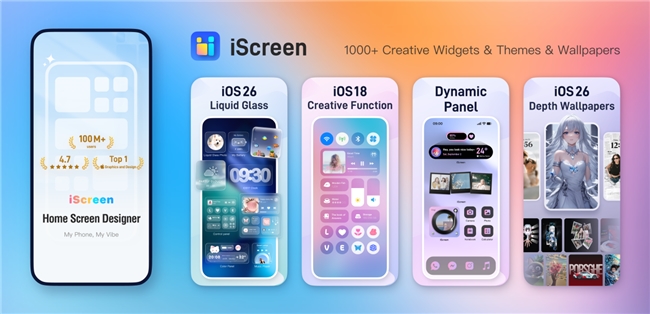
Why It Stands Out
Unmatched Variety
With over 1,000 customizable widgets, iScreen is an all-in-one iPhone customization app that covers everything from weather and fitness tracking to productivity tools and countdowns.
Deep DIY Customization
It provides the easiest way to customize iPhone layouts with pixel-perfect precision. You can adjust backgrounds, fonts, and borders to create a cohesive look from your Lock Screen to your Home Screen.
Next-Gen Integration
iScreen has mastered the Dynamic Island and the new iOS 26 features, offering Liquid Glass components and depth-integrated wallpapers that feel like a native part of the OS. It is widely considered the best app for customizing the iPhone Lock Screen due to its spatial awareness features.
Market Presence
The application has surpassed 100 million global users, ranking among the top three mobile customization platforms worldwide.
It has also been featured by Apple editors in 128 countries as a Must-Have Productivity Tool.
-
Widgetable: Designed for Social Connection
If you see your phone as a tool for staying emotionally connected, Widgetable is a compelling option.
While iScreen positions itself as a comprehensive themes and widgets platform, Widgetable has carved out a niche in social widgets. It allows couples and close friends to share real-time moods, step counts, or even co-parent a virtual pet directly from their home screens.
Although it doesn’t offer the same breadth of utility features as iScreen, it excels at creating meaningful, interactive experiences that bring a sense of connection to everyday phone use.
-
Widgetsmith: The Minimalist’s Automation Tool
Widgetsmith remains a go-to choice for users who prefer a “set it and forget it” approach.
Its core strength lies in logic-based scheduling, enabling widgets to change automatically throughout the day — for example, showing weather in the morning, calendar events during work hours, and activity rings in the evening.
While it doesn’t provide the same visual depth or extensive DIY options as iScreen, it offers one of the simplest ways to add widgets on iPhone for users who prioritize automation over aesthetic customization.
Summary: Which One Should You Choose?
In 2026, the right choice ultimately depends on your priorities:
? If you want to customize iPhone home screen easily with the highest aesthetic standards and the most features, iScreen is the definitive winner. It is arguably the best iPhone customization app on the market today.
? For social interactions, go with Widgetable.
? For scheduled, minimalist utility, stick with Widgetsmith.
For most users, iScreen is the best widget app for iPhone because it eliminates the need for multiple apps, providing a one-stop shop for a stunning, futuristic iOS 26 setup.